
Can AI follow a sketch?
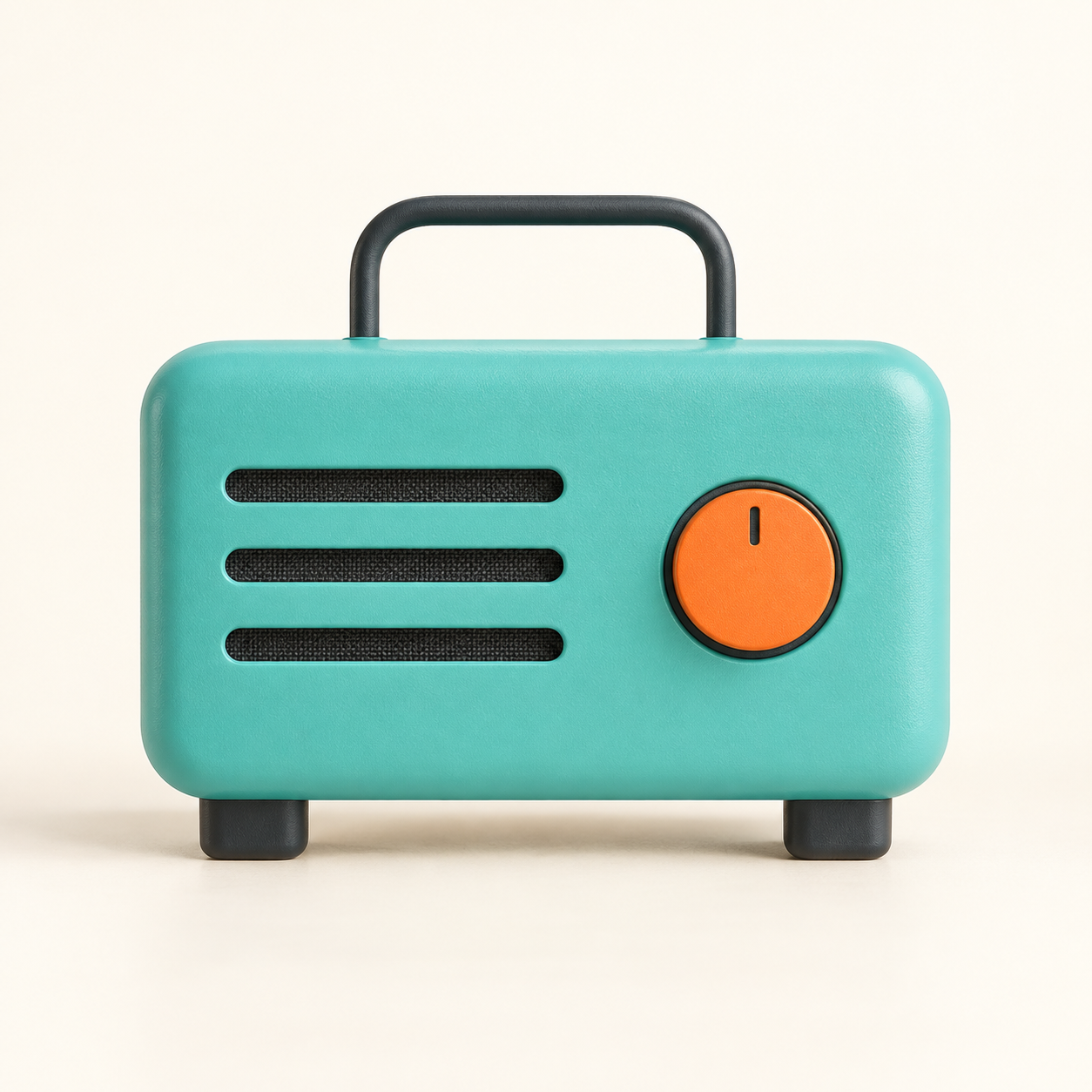
A flat drawing of a turquoise radio became a convincing product concept. That transformation is the eye-catching part. The more useful question is whether the details survived.
We made a simple reference ourselves, supplied it to the built-in OpenAI image tool, and kept the first returned result. No manual retouching. Before generating anything, we wrote down four things to inspect: three speaker slots on the left, one orange dial on the right, an arched handle above, and two dark feet below.
What happened
All four visible structural requirements appear in the result. The image also retains the broad arrangement and turquoise body. The flat shapes become a dimensional-looking object with textured surfaces, rounded edges and soft shadows.
It is not an exact reconstruction. The image introduces material details that were absent from the drawing, and the outlines and proportions are not pixel-identical. It is a fictional product concept, not evidence that this radio exists or could be manufactured as shown.
Two inputs, one result
The tool received both the reference image and a text prompt describing the same constraints. We did not run a text-only comparison or a sketch-only comparison. This example therefore cannot tell us how much the sketch helped, independently of the words.
Nor can one output establish a success rate. A different design, prompt or generation could behave differently. The exact model identifier was not exposed by the tool, so we are not presenting this as a benchmark of a named model.
Why try this now?
OpenAI's September 8 announcement of ChatGPT Images 2.5 describes a Sketch workflow for turning rough drawings into finished images. That is the inspiration for this experiment, rather than a new announcement today. Read OpenAI's announcement.
Our experiment used a code-drawn PNG as a reference in the built-in image tool. We did not test the ChatGPT Sketch interface or verify that it uses the same model. OpenAI also publishes guidance on image prompts and reference inputs. Read the official prompting guide.
A useful way to try it
Draw the arrangement you want. Describe the details that matter. Write down what you will check before generating the result. Then inspect those details separately from whether the image looks attractive.
That last step matters: a polished image can make a design feel correct before you have counted the parts. In our example, the count and placement held up. The saved prompt and untouched output below let you make your own assessment.
Experiment performed September 29, 2026. Original REVL reference drawing; AI-generated result and synthetic video narration. One generation, first returned image preserved.
OPEN NOTEBOOK
The instruction, in full.
Reference-image prompt
Use the attached original flat drawing as a visual reference. Create one premium photorealistic studio product concept photograph of this imaginary small retro desk radio. Front view, centered entire product, cream seamless background, soft warm studio light, physically believable matte turquoise plastic shell and subtle material texture, beautiful restrained industrial design. Preserve these four observable constraints: (1) exactly THREE horizontal dark speaker slots on the viewer's LEFT, (2) exactly ONE circular orange dial on the viewer's RIGHT, (3) one arch-shaped carrying handle above the body, (4) exactly TWO short dark feet beneath the body. Preserve their broad layout and the turquoise body. The sketch is deliberately simple; translate its shapes into dimensional materials and realistic lighting. No lettering, branding, screens, added buttons, extra grilles, hands, people or props. Square image, all parts visible with generous margins. This is an original fictional concept, not a real product.
Tool: built-in OpenAI image tool. Exact model ID not exposed. One reference plus matching text; first output retained.
REVL / AI IN PRACTICE
Useful capabilities.
Visible evidence.
Original demonstrations, clear explanations, and the details that matter.